How How to Build a Local AI Chat App with Ollama (No API, No Cost)
3 min read
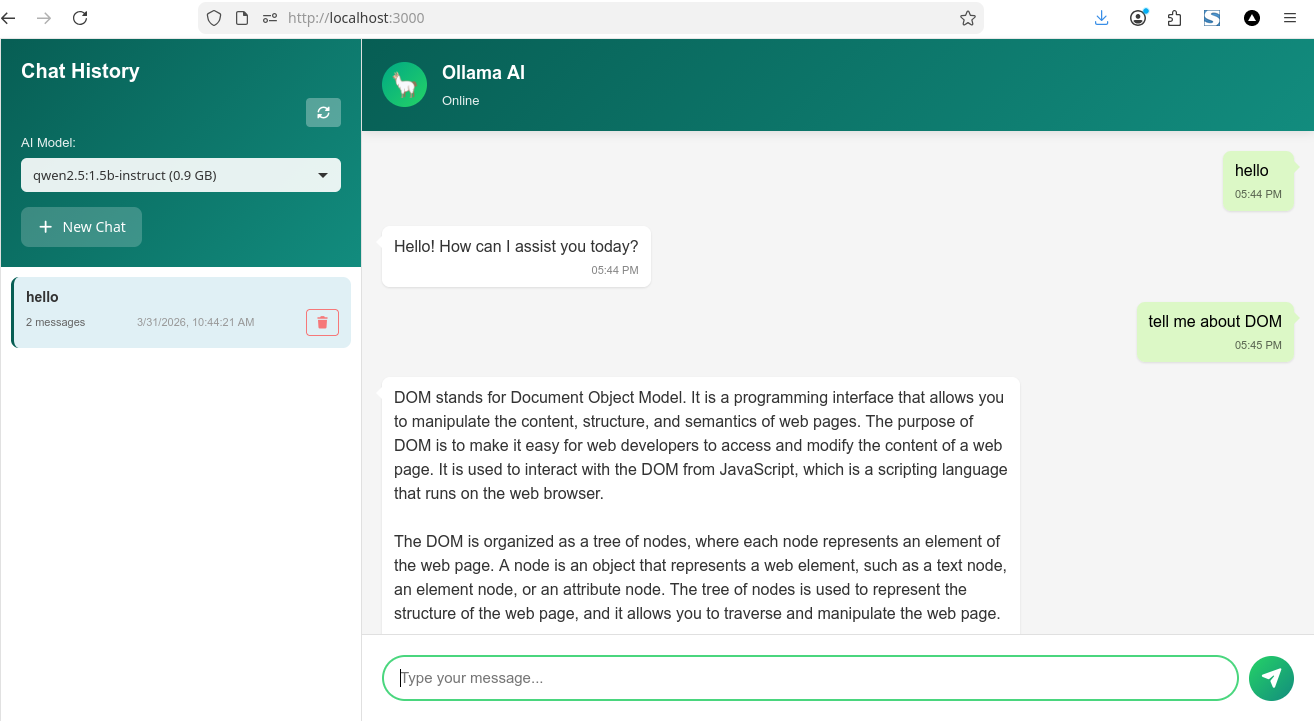
Most AI chat apps today rely on paid APIs.
But what if you could run everything locally?
Instead of a tutorial, today I want to share a project I’ve been working on — a local AI chat app powered by Ollama, built with a lightweight UI and a simple Node.js backend.
No API. No cost. Full control.
If you’re interested, you can check out the GitHub repository below.
What is Ollama?
Ollama is a tool that lets you run large language models locally on your machine.
With Ollama, you can:
- Run AI models offline
- Keep your data private
- Avoid API limits and costs
- Switch models
Features of This AI Chat App
This project is more than just a simple demo.
It includes:
- 💬 Real-time streaming chat
- 📂 Multiple chat sessions
- 🧠 Smart context management
- 🤖 Model selector (switch AI models)
- 💾 SQLite database for history
This makes it feel like a real AI product, not just a prototype.
Backend Overview (Node.js)
The backend acts as a bridge between your UI and Ollama.
Main responsibilities:
- Handle API requests
- Proxy to Ollama
- Save chat history
Example endpoint:
This endpoint sends messages to Ollama and streams the response back to the UI.
Frontend Overview
The chat UI handles:
- User input
- Streaming responses
- Session switching
- Model selection
The result is a fast and responsive chat experience, similar to modern AI apps. if you read my post before the ui use Chat UI i build with el.js
Key Features Explained
1. Streaming Response
Responses appear word by word, creating a real-time chat feel.
2. Multi-Session Support
Each chat is saved and can be reopened anytime.
3. Smart Context Handling
Older messages are summarized automatically to keep performance fast.
4. Model Switching
Easily switch between installed Ollama models.
Why Build a Local AI App?
Building a local AI app gives you:
- 🔒 Full privacy (no data sent to external servers)
- 💸 Zero API cost
- ⚡ Faster response (no network latency)
- 🛠️ Full customization
This is perfect for developers who want full control over their AI tools.
Use Cases
You can turn this project into:
- AI coding assistant
- writing assistant
- internal company chatbot
- offline AI tool
- personal productivity assistant
if you like this post please support me on below.
Support My Work
If you enjoyed this article, consider buying me a coffee to help keep the blog running!
Buy Me a Coffee